What content works best on school digital signage?
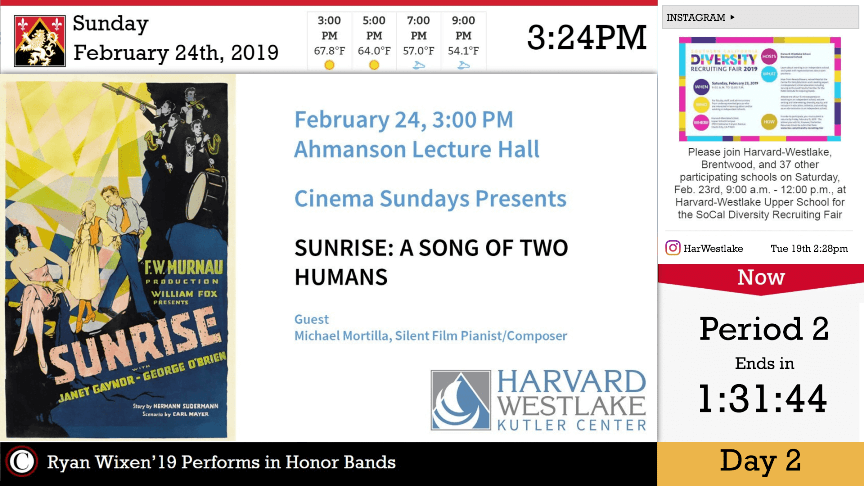
The best school digital signage content is useful, current and matched to the people who will see it. A strong rotation combines recurring information – such as menus, visitor information and school branding – with time-sensitive announcements, events, recognition and seasonal messages. The goal is not to fill every screen with more content; it is to make each screen a dependable source of information for its location and audience.
For readers evaluating a complete school communication approach, explore
Digital Signage for Schools & Districts.
This guide stays focused on content strategy rather than software or implementation.
TL;DR: Six content types to prioritize
- Daily announcements – students and staff; refresh daily.
- Events and school calendars – students, families and visitors; refresh weekly and whenever details change.
- Student recognition – the wider school community; refresh weekly or when achievements occur.
- Cafeteria and everyday information – students and staff; refresh daily.
- Weather and time-sensitive updates – the entire school community; update whenever circumstances change.
- School community and culture – students, staff and visitors; refresh weekly.
1. Daily announcements
Daily announcements are the foundation of useful school displays because they turn frequently changing information into something students and staff can encounter throughout the day. They work best when the message is brief, specific and removed as soon as it is no longer relevant.
Audience: students and staff.
Best locations: hallways, student commons and cafeterias.
Refresh: daily.
Practical examples include morning announcements, bell-schedule reminders, testing dates, lost-and-found notices and upcoming deadlines.
2. Events and the school calendar
Event content keeps important dates visible beyond a single email or paper notice. Use it to reinforce what is happening next and update individual event messages as dates, times or locations change.
Audience: students, parents and visitors.
Best locations: entrances, hallways and the front office.
Refresh: weekly, with event-specific updates as needed.
Practical examples include concerts, parent evenings, sports fixtures, club meetings and assemblies.
3. Student recognition
Recognition content gives screens a role in school culture as well as day-to-day information. Rotating achievements helps ensure displays do not become a stream of reminders and operational notices only.
Audience: students, staff, parents and visitors.
Best locations: the main entrance, hallways and cafeteria.
Refresh: weekly or whenever achievements occur.
Practical examples include honor roll, athlete of the week, student artwork, attendance milestones and birthdays.
4. Cafeteria and everyday information
Frequently changing everyday information gives students a practical reason to check school screens. This content should be especially concise because viewers often encounter it while moving through busy shared spaces.
Audience: students and staff.
Best locations: cafeteria and student commons.
Refresh: daily.
Practical examples include lunch menus, special meals, nutrition campaigns and daily reminders.
5. Weather and time-sensitive updates
Current information can make displays more useful when school routines change. Weather, closures, transportation changes and early-dismissal notices should be updated as circumstances change and removed promptly when they are no longer current.
Audience: the entire school community.
Best locations: entrances, hallways and reception.
Refresh: as needed.
Practical examples include weather information, school closures, bus changes and early-dismissal notices. Emergency communication should remain part of established school procedures; this content guide does not assume any specific alert integration or workflow.
6. School community and culture
Not every school screen needs to be purely operational. Community and culture content can balance the rotation with messages that reflect the people, history and activities that make the school distinctive.
Audience: students, staff and visitors.
Best locations: student commons, the library and main entrance.
Refresh: weekly.
Practical examples include teacher appreciation, community partnerships, school history, volunteer recognition and upcoming campaigns.
Match content to the screen location
A useful content strategy starts with context. A message that matters in the cafeteria may not deserve the same prominence at the main entrance, and visitor-facing screens should not simply repeat a student hallway playlist.
| Location | Prioritize | Typical refresh |
|---|---|---|
| Main entrance | Welcome information, events, recognition, school culture | Weekly; update time-sensitive items as needed |
| Hallways | Daily announcements, events, deadlines, recognition | Daily to weekly |
| Cafeteria | Menus, daily reminders, recognition | Daily |
| Student commons | Announcements, culture, activities, everyday information | Daily to weekly |
| Library | School news, events, culture and campaigns | Weekly |
| Front office / reception | Visitor information, events, time-sensitive updates | As information changes |
| Gym / athletics areas | Sports fixtures, activities, recognition | As schedules and results change |
Build a balanced content rotation
The strongest school displays mix stable reference information with rotating messages. Not every item needs to stay on screen all day, and not every screen needs the same playlist. A balanced rotation prevents one category from crowding out everything else.
| Keep available when relevant | Rotate and refresh |
|---|---|
| Time | Events |
| Weather | Recognition |
| School branding | Announcements |
| Visitor information | Student achievements |
| Cafeteria information | Seasonal campaigns |
Use the “always visible” side for information that remains useful in that location, then rotate the second group according to the school calendar and audience. When an item expires, remove it rather than letting the screen become a digital archive.
A simple content-planning routine
A lightweight routine can keep screens useful without turning content maintenance into a large project. Start by assigning each screen an audience and purpose. Then identify the recurring information that belongs there, add time-sensitive messages from the school calendar, and set a review cadence for removing expired content. Finally, invite relevant departments to contribute upcoming items through a clear ownership process.
For deeper planning and governance guidance, see
How to Set Up a Digital Sign for Schools.
For content sources and integrations, explore
Top Digital Signage Apps for K-12.
For scenario-based examples, read
6 Ways to Use Digital Signage in Schools.
How often should school digital signage content be updated?
Update content whenever the underlying information changes. Daily announcements and cafeteria information typically need daily attention; events can be reviewed weekly with additional updates as dates approach; recognition and culture content can rotate weekly; and weather or time-sensitive notices should change as needed. The important rule is that expired information should not remain on screen.
Customer evidence: communication works when content stays varied and useful
Validated K-12 examples in the Content Intelligence Hub include Aurora Public Schools, Westborough Public Schools, Spruce Grove High School and Cumberland Regional High. These examples support the broader communication themes behind this guide – district-wide or multi-school communication, varied school content, student engagement and everyday communication – without turning this article into a product or case-study page.
Frequently asked questions
What should schools display on digital signage?
Schools should prioritize information people need during the school day: announcements, events, calendars, recognition, menus, weather or time-sensitive updates, visitor information and school-culture content. The right mix depends on the screen location and audience.
How often should school digital signage content be updated?
Update it whenever the information changes. Some categories, such as announcements and menus, may change daily; events and recognition often work on a weekly rhythm; urgent or weather-related information should change as needed.
What content attracts the most attention?
The source materials do not support a universal “most attention” ranking. A stronger rule is to use content that is timely, relevant to the viewer and appropriate to the screen location, then keep the rotation varied enough that displays do not become repetitive.
Should schools display social media on digital signage?
Social content can support school culture or community updates when it is appropriate, but it should not displace essential operational information. Treat it as one possible rotating content source rather than the purpose of the screen.
What information should always remain visible?
Keep persistent information visible only when it remains useful in that location. Examples can include time, school branding, visitor information or cafeteria information. Other messages should rotate or appear only when relevant.
How can schools keep digital signage content fresh?
Use a repeatable review cadence, remove expired messages, plan around the school calendar, vary content categories and assign clear ownership. The goal is to keep screens current and relevant without requiring staff to recreate everything from scratch each day.
Make every screen useful
Effective school digital signage is less about filling screens and more about choosing information that belongs in that place, for that audience, at that moment. Build a balanced rotation, update it at the pace of the information, and remove content when it expires. Once the content strategy is clear, readers can explore the
Digital Signage for Schools & Districts
page for the broader solution,
Top Digital Signage Apps for K-12
for content sources, or
How to Set Up a Digital Sign for Schools
for planning and governance.